

Human and agent collaboration
Hand the task to your agent. Review the run.
TMGR is a free task manager built for working with AI coding agents. The agent picks up a task over MCP, reports branch, commits, tests and the PR link, and you review it on the same card. Bring your own agent: Claude Code, Codex, Cursor or any MCP client. It runs on your machine. Agent time is counted apart from yours. Your code stays on GitHub or GitLab.
Start freeOpens sign-up: GitHub, Google, Apple, Telegram or email.
Rather keep your data off the cloud? The desktop app works offline without an account.
- 03:21:56whoamipersona Scout · Juniper Lane Studio
- 03:21:57list_my_queue9020 WEB-1: Fix newsletter signup validation
- 03:21:58workspace_contextStudio context · How we work · Agent notes
- 03:21:58pages_for_task taskId=90200 pages
- 03:21:59start_agent_work taskId=9020 agent=claude-code model=claude-sonnet-5-5 branch=mainrunId=1
- 03:22:14update_agent_work runId=1 commits=["13d9317 fix: validate email format and allow plus addressing"]
- 03:22:20update_agent_work runId=1 testsCommand="npm test" testsPassed=6 testsFailed=0
- 03:22:22add_comment taskId=9020"… npm test 6/6 pass. Commit 13d9317 on main, not pushed."
- 03:22:25finish_agent_work runId=1 status=succeededrun 26s
Sample run: the MCP calls an agent makes on WEB-1. Values match the screenshot.
finish_agent_work this Agent work row on WEB-1
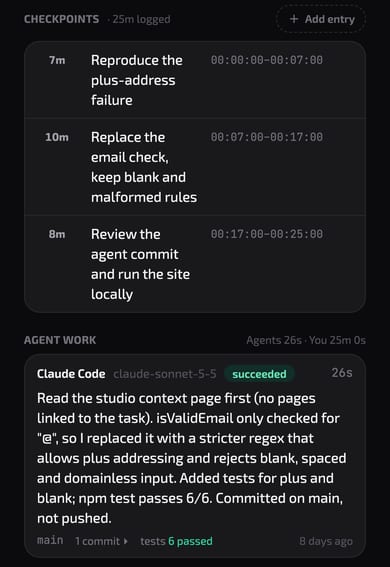
1 commit · tests 6 passed · 26s run
- Agents
- 26 seconds
- You
- 25 minutes
Same task · logged separately · never summed
Recorded durations on WEB-1: the agent's run, and your checkpoints. Shown as the task panel shows them.
01 / Loop
Four steps from queue to record.
- 1Assign
Put a persona on a task. The persona is the agent's identity in your workspace.
assign_personaHumans assign; a persona token cannot assign.
- 2Pick up
The agent reads its queue and the workspace context page before it starts.
list_my_queueworkspace_contextpages_for_task - 3Report
It opens a run and reports branch, commits, tests and PR link as it goes.
start_agent_workupdate_agent_work - 4Close
It finishes the run and comments on the task. You review.
finish_agent_workadd_comment
Runs, commits and tests appear on the task under Agent work. The owner can switch agent work off per workspace.
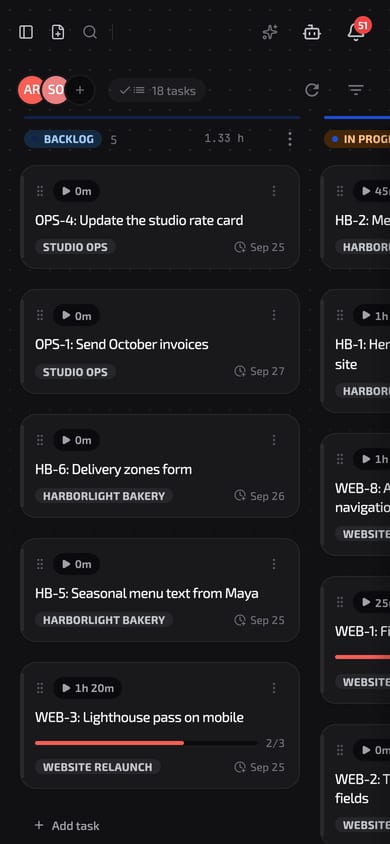
Board, Juniper Lane Studio. Member avatars in the header; WEB, HB and OPS categories; persona avatars on cards.
Agent work log
Every run is on the record.
Each run keeps the agent and model, time spent, branch, commits, the PR link and test results. Open the task and it is under Agent work; agents and scripts read it back with list_agent_work.
Your code stays on GitHub or GitLab. TMGR does not host repositories or run your CI. It keeps the record: which task, which agent, how long, and the links to the commits and PR.
- Time spent
- Duration of the run, kept apart from your own time.
- Branch and commits
- Every commit as sha and subject, added as the agent goes.
- Pull request
- The PR link, once the agent has one.
- Tests
- The command, passed and failed counts.
Team
Same board for people and agents.
Invite people by email or a shareable link. Everyone works the same board, sees who is active, and sees agent runs on the same tasks.
Start freeOpens sign-up: GitHub, Google, Apple, Telegram or email.
02 / Offline & private
Keep it all on your machine. No account, no cloud.
For people who don't want their tasks and time logs in someone else's cloud. On first launch of the desktop app choose Start without an account: your workspace is a folder on your computer and works offline. Create an account later and the local workspace stays next to your cloud ones.
Download the desktop appWelcome to TMGR
Tasks, boards and a timer on every task. Start right away or sign in.
Your data stays on this Mac. You can create an account later.
Local workspaces hold tasks, comments, files, routines, Pages, Graph, agent work and personas. No dashboard or human assignees locally.
- Backups
- Each local workspace is backed up once a day into its backups folder and every copy is checked. The last 7 days, 4 weeks and 3 months are kept. Back up now is in Settings.
- Local agents
- Settings, Agents creates a Local agent and a token, so Claude Code or Codex can work in your local workspace over MCP. Not on Windows yet.
- Privacy
- The desktop app loads no Google Analytics, Yandex Metrica or Plausible.
- Needs an account
- Dashboard, Pomodoro, the AI assistant, GitHub, Telegram and notifications show Requires an account.
03 / Personas
Give each agent a persona. Grant scopes per workspace.
A persona has its own name, system prompt and token. Tokens last 1–365 days, are shown once and stored hashed.
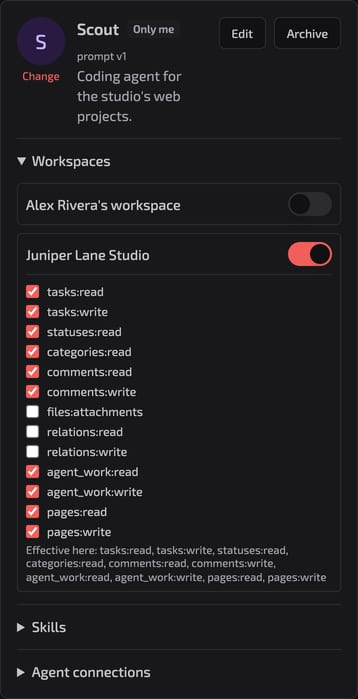
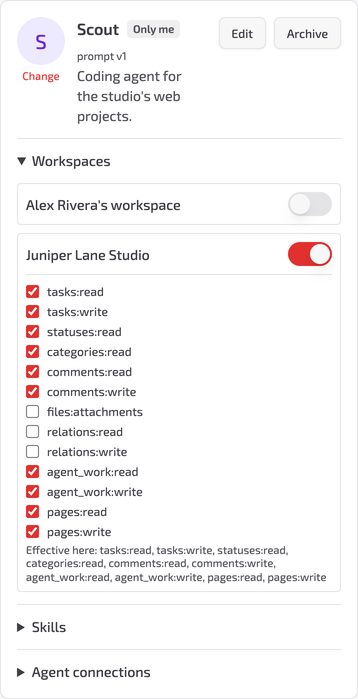
| Scope | Opens | Scout |
|---|---|---|
tasks:read | get_task list_my_queue search_tasks list_tasks_by_status | granted |
tasks:write | create_task update_task | granted |
comments:write | add_comment | granted |
agent_work:write | start_agent_work update_agent_work finish_agent_work | granted |
pages:read | workspace_context pages_get pages_for_task pages_search | granted |
pages:write | pages_create pages_update pages_append pages_set_section | granted |
files:attachments | list_task_files get_task_image | not granted |
relations:write | task relations | not granted |
Scout has no files:attachments in Juniper Lane Studio. Its get_task_image call is refused by the server, whatever its prompt says. Scopes are enforced; the system prompt is guidance.
Workspace policy for personas: allowed, read only, or forbidden.
Persona docs04 / Context
A context page agents read before work.
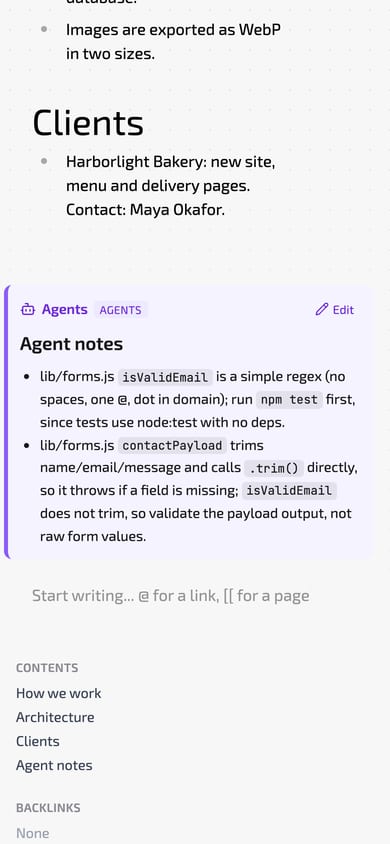
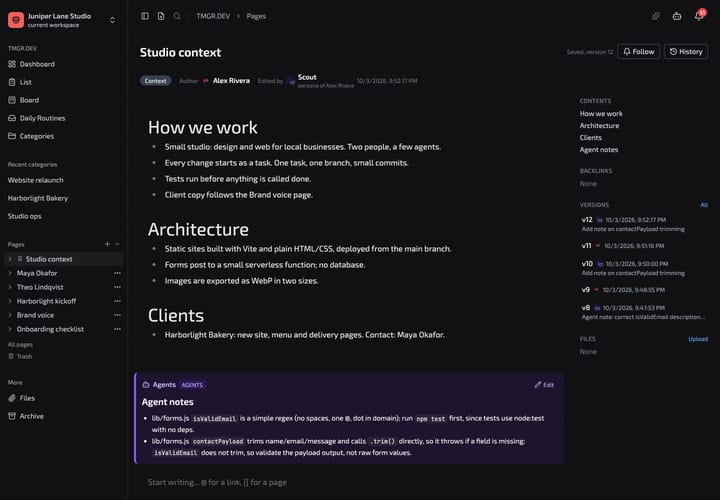
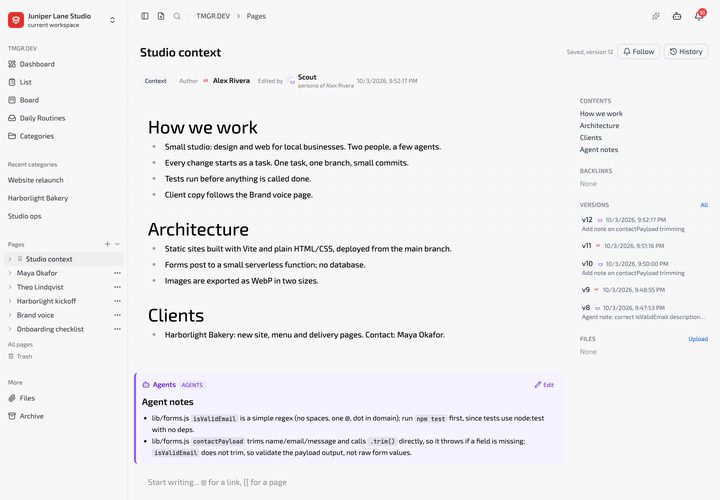
Pages are Markdown documents next to your tasks. TMGR tells agents to read the context page before work. On a context page an agent may write only the Agent notes section. Every write is attributed to the persona.
lib/forms.js isValidEmail is a simple regex (no spaces, one @, dot in domain); run npm test first, since tests use node:test with no deps.
The next run on this workspace starts from this note. Calls: workspace_context to read, pages_append to write.
- Links
@and[[link tasks, pages and people. Backlinks show where a task is mentioned.- Versions
- Every save is a version. Diff and restore.
- Types
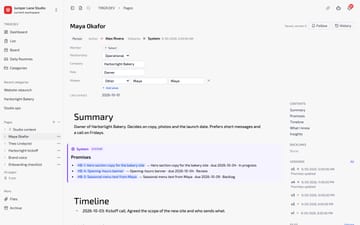
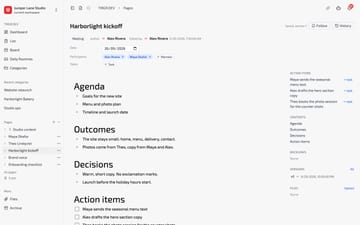
- Person pages and meeting pages: Maya Okafor, Harborlight kickoff.
- Import / export
- Export a page as .md or a tree as .zip. Import .md or a .zip from Obsidian or Notion.
Opens sign-up: GitHub, Google, Apple, Telegram or email.
05 / Time
Your clock runs on its own.
Agent run time is logged per run. Your time comes from your timer and checkpoints. WEB-1: Scout's run took 26s; you logged 25m reproducing, fixing and reviewing.
- Timer
- Start and stop per task. Several at once. Estimate and overtime.
- Checkpoints
- Log what you did, with start and end. WEB-1: 3 entries, 25m.
- Pomodoro
- Focus and breaks per task. Break time can pause tracking.
- Export
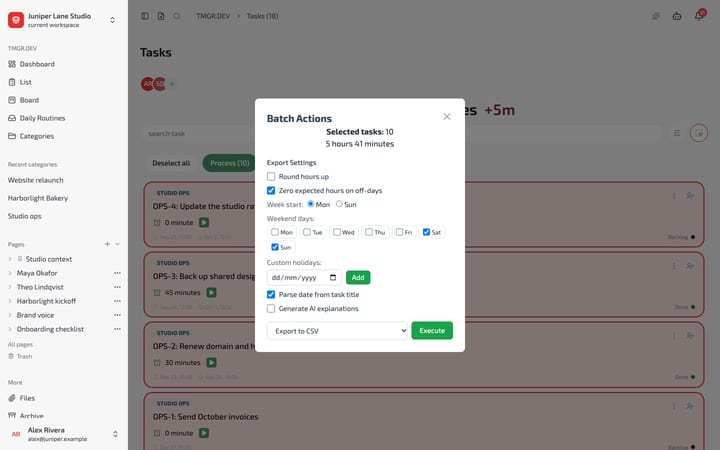
- Selected tasks to XLSX, CSV or image (JPEG), with hourly rate and rounding.
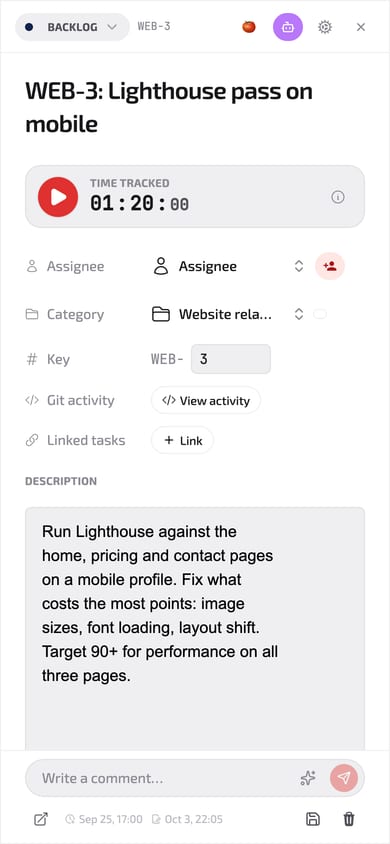
WEB-3: 3 checkpoints, 1h 20m
06 / MCP setup
Connect an agent in four steps. 52 MCP tools.
- 1Sign up
Create a free account.
- 2Persona
Settings Personas: name it, grant scopes, create a token. The token is shown once.
- 3Connect
Add TMGR to your agent as a Streamable HTTP MCP server at /mcp, with the header X-Persona-Token.
- 4Assign
Put the persona on a task. The agent finds it with
list_my_queue.
claude mcp add --transport http tmgr https://api.tmgr.dev/mcp \
  --header "X-Persona-Token: <persona-token>"
Claude Code. Other clients: the same URL and header in their MCP config. The exact snippet with your host is in the persona's Connect an agent dialog. To act as yourself, use X-Smart-Device-Token from Settings Smart devices.
Opens sign-up: GitHub, Google, Apple, Telegram or email.
- TASKS10
create_taskget_taskupdate_taskdelete_tasklist_taskslist_tasks_by_statussearch_taskslist_my_queueget_task_imagelist_task_files- AGENT WORK4
start_agent_workupdate_agent_workfinish_agent_worklist_agent_work- PAGES9
workspace_contextpages_treepages_getpages_searchpages_for_taskpages_createpages_updatepages_appendpages_set_section- PERSONAS5
get_personaget_persona_skilllist_assignable_personasassign_personaunassign_persona- COMMENTS2
add_commentlist_comments- STATUSES3
list_statusescreate_statusupdate_status- TIME4
start_task_timerstop_task_timertime_summarydeadline_report- ROUTINES6
create_routinecreate_recurring_routinecomplete_routineexpand_routineslist_routinesskip_instance- WORKSPACE4
whoamilist_workspaceslist_memberstmgr_request- GRAPH5
graph_relatedgraph_pathgraph_hubsgraph_orphansgraph_mapGraph is off by default; enable in Settings Features.
07 / Workspaces
One workspace per context.
Keep your own projects, a team and each client in separate workspaces. Every workspace has its own statuses, categories, members and context page. Agents only see the workspace their persona is granted.
- Pages
- new workspaces
- Graph
- off until enabled
- Agent work
- on, can be switched off
Modules are switched per workspace in Settings. Presets: Personal, Team, Developer with AI agents, Everything, Minimal. Anyone can also hide a module just for themselves.
- Statuses
- Ordered and coloured per workspace. Backlog, active, completed, hidden and archived are types that agents filter by.
- Members
- Invite by email or a shareable link. The owner manages the workspace.
- Personas
- Grant each persona its scopes per workspace. Workspace policy: allowed, read only or forbidden.
- Workflow
- Turn the Workflow module off for a simple Done checkbox instead of statuses and a board.
08 / Plugins
Bring your own plugins.
Plugins extend the desktop app: pages in the sidebar, sections on a task, badges on board cards, status bar and tray items, and your own items in the task more menu. Plugins run in the desktop app only.
{
  "id": "acme.send-to-ci",
  "engines": { "tmgr": "^1.6" },
  "permissions": ["menus:task"],
  "contributes": {
    "commands": [{ "id": "send", "title": "Send to CI" }],
    "menus": { "task/card": [{ "command": "send", "title": "Send to CI" }] }
  }
}
The command runs with the task id and workspace id. Sample; the acme id is a placeholder.
- Sandboxed
- Plugin code runs in a QuickJS sandbox. Its only network access is the localhost ports its manifest declares.
- Permissions
- You approve the permission list at install. An update that adds a permission asks again.
- Signed
- Bundles are signed and the publisher key is pinned at first install.
- Install
- Paste owner/repo of a GitHub release in Settings, Plugins, or load a folder in developer mode with hot reload. Enabled per workspace.
09 / Phone alarm
When the agent needs you now, it can call your phone.
An agent raises an alarm with @tmgr/notify. Your iPhone rings first. If nobody acknowledges, TMGR calls the phone number you verified and reads the alarm aloud.
- Reads aloud
- title up to 120, message up to 500 characters
- Acknowledge
- press 1
- Each ring
- up to 55 s
- Attempts
- 3 by default, up to 5, 20 s apart
A voicemail answer is hung up and counts as unanswered. With Repeated Calls allowed in your iOS Focus, a second call within 3 minutes can get through.
- 1Raise
The agent sends an alarm with a title and a message.
alarmalarm_status - 2Ring
The iPhone rings through Silent mode and Focus (iOS 26+). Stop or Acknowledge on the phone or Watch ends it.
- 3Call
No acknowledgement in time: TMGR calls your alarm phone. Press 1 to acknowledge.
- 4Repeat
Unanswered calls are retried. An acknowledgement from any channel stops the rest.
- Verified number
- Add it in the iOS app under Settings, Alarm phone, and confirm it with an SMS code. Five wrong codes erase it. Nothing is dialled until it is verified.
- Stored encrypted
- The number is encrypted at rest and the app shows only a masked form.
- Caller number
- The app shows the number alarms call from, with Add to contacts, so you can save it and recognise the call.
- Test call
- Send yourself a test call from Settings.
10 / Also included
And the rest.
- Graph
Links between tasks and pages as a neighbourhood view and a workspace Map: hubs, bottlenecks, orphans. Off by default; enable it in Settings.
- Pages in Markdown
Export a page as .md or a tree as .zip. Import .md or an Obsidian or Notion export.
- Routines
Daily and recurring routines, convertible to tasks. Agents manage them over MCP.
- @tmgr/notify
Public npm package. Your agent sends a push to your phone or raises an alarm. Source on GitHub.
- Desktop everywhere
macOS, Windows, Linux and Nix. Quick Add is a global hotkey, Option+Space by default.
- Telegram
Send a text or voice message to the bot and get a routine draft. Sign in with Telegram.
- iPhone and Watch
iOS app in TestFlight beta: timer in the Dynamic Island, widgets, Apple Watch.
11 / Surfaces
Where it runs.
| Surface | What | Status |
|---|---|---|
| Web | Board, list, tasks, Pages, personas, settings | availableStart free |
| Desktop app | macOS (Apple Silicon, macOS 11+), Windows x64, Linux x86_64. Local workspaces stored on your computer. On macOS: menu-bar timer, quick add (Option+Space) | availableDownloads |
| Desktop packages | macOS .dmg Windows .exe .msi Linux .deb .AppImage .rpm .snap Nix (x86_64 Linux) nix profile install github:tmgr-dev/frontend#tmgr | available |
| Telegram bot | Text or voice message routine draft. Sign in with Telegram | available |
| @tmgr/notify | npm package: MCP server and hook CLI. Your agent sends a notification to your phone, delivered by Telegram or the iOS app | availablenpm |
| iOS | Timer in the Dynamic Island, widgets, Apple Watch | TestFlight beta Join beta |
| Alarm calls | Escalate an agent alarm to a phone call | available |
12 / Price
Free.
Sign up, connect your agent, assign WEB-1 of your own.
Start freeOpens sign-up: GitHub, Google, Apple, Telegram or email.